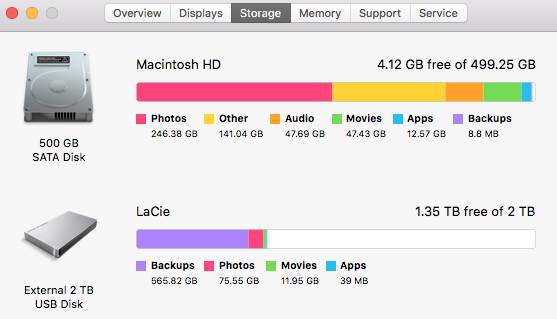
so, my issue is that the hard drive is full. apparently with 246Gb of photos.
yet i can't find where these photos are stored?
when i break the hard drive down (it only shows me 5 folders) the 'users' folder reveals 160Gb of data and the others a combined total of about 22Gb?
which doesn't make sense at all to me.
what id like to do, is move the photos from the Mac hard drive to the 'LaCie' external drive but if i can't find them i can't move them.
i know this probably belongs on an apple support forum, but I'm not the best at navigating that site either.

The photos are probably in iPhoto. This is a capsule not a folder. Export them then delete from iphoto.
A bit like microsoft emails.
Not sure about how different the Mac works. I suspect the filing systems would be quite similar between different operating platforms. With MS Windows, you can right-click on the image thumbnail to see the properties of images. From that, you can get an idea where they are being stored. May I suggest you learn the basic of file management. It will help you in future. Please note that this is not meant to take the piss.
Select to expand quoteJupiter said..
Not sure about how different the Mac works.
Should've typed that, thought about it, then deleted the post.
If he could find the photos to right click on them, he wouldn't need to ask the question... 
Get the demo version if cleanmymac, scan the drive and use the info to track them down. If you've done any editing, or even just viewing, the stupid Mac will have duplicated them for you, so you don't bork the originals.
thanks for the suggestion sea breeze knowledge bank.
I'm wondering if the fact that apple has made iPhoto obsolete is part of my problem (although i doubt it) i used to file my photos very effectively in there, however that app is now obsolete and oSx makes you use photos.
unfortunately, right clicking on the image in photo only allows me to add title and give me info on the camera settings etc it was taken with. no location.
oh well, looks like i might need to get one of the iT guys at work to remote log in to my computer and help me.
thanks again guys.
Sorry can't be of assistance. One last straw...How about asking your good mate Jimmy Google about your problem ? Surely someone among the millions of Mac users would have had encountered similar heartache ?
i just checked in Photo on a Mac laptop. Open Photo, select all photos by Command, A, then File Export
www.seabreeze.com.au/Img/Photos/Other/11450797.jpg' />
Have you previously thought you had deleted the pics? I have an idea if that's the case.
In thumbnail view in iphoto command+click on an image and select "go to location". That will open the folder in finder where that photos is, easy to browse to the rest from there.
Select to expand quoteJupiter said..
Not sure about how different the Mac works.
don't question it , ask any apple user and their answer will be . "It just works "
Select to expand quoteDawn Patrol said..
Try emptying the trash?
that way you can fit the Mac in the bin easily